Departments are used to help management be able to print profit reports and other necessary information in a logical format, focusing on a specific department of the business. Departments are an extension to the general ledger account numbers. They are three digit codes used to designate different departments, divisions, locations, or product lines of a company. Departments can be a powerful to analyze the profitability of a specific segment of the company. The system facilitates separate Profit & Loss statements for individual departments or Profit Centers as well as other financial statements.
Although departments and Profit Centers can be synonymous, the following distinction will be used throughout the EBMS software.
· A Department is a separate activity or product line within a company. A department is coded within the general ledger chart of accounts by the 3-digit extension to the main 5-digit account code.
· A Profit Center can consist of a group of one or more departments that are grouped together for financial summaries such as profit & loss and balance statements.
Overhead costs can be posted to a single general ledger account and then allocated to individual profit centers based on a monthly or annual percentage. The percentage distribution is dynamic can be entered on a monthly or annual basis. For example: multiple profit centers may share a common building and the building costs such as maintenance, utilities, and insurances. These costs are then distributed to the individual profit centers based on the percent of space used within the building.
It is recommended that you plan your departments and Profit Centers prior to using the system. Creating these groups after transactions have been processed creates some possible complications.
Department and Profit Center Examples
Following are some examples of how departments and Profit Centers may be used:
A hardware store may divide the store in the following departments:
· Tools
· Sporting equipment
· Lawn & Garden
· Automotive
· Hardware
· Building supplies, etc
The manager may identify each department as a separate profit center or he may combine a few of the departments together into a common profit center that is managed by the same person. A possible advantage of creating departments for this storeowner would be to determine which departments are the most profitable within his operation.
A farm equipment dealer may want to create the following departments:
· Farm tractor sales
· Farm tractor service
· Harvesting & cultivating equipment sales
· Harvesting & cultivating equipment service
· Lawn and garden equipment sales
· Lawn and garden equipment service
With the following Profit Centers:
· Sales Profit Center which includes all the sales departments
· Service Profit Center which includes all the service departments
Another possible use for Profit Centers would be to identify locations for companies with multiple locations as well as multiple departments within each location. A hardware storeowner may own more than one store with the departments listed in our first example.
Company profit centers would include:
· Location A
· Location B
· Mobile service truck
Each of the locations would contain one or more of the following:
· Tools
· Sporting equipment
· Lawn & Garden
· Automotive
· Hardware
· Building supplies
Profit Centers can also identify entire divisions within companies, such as:
· Manufacturing division
· Service division
· Sales division
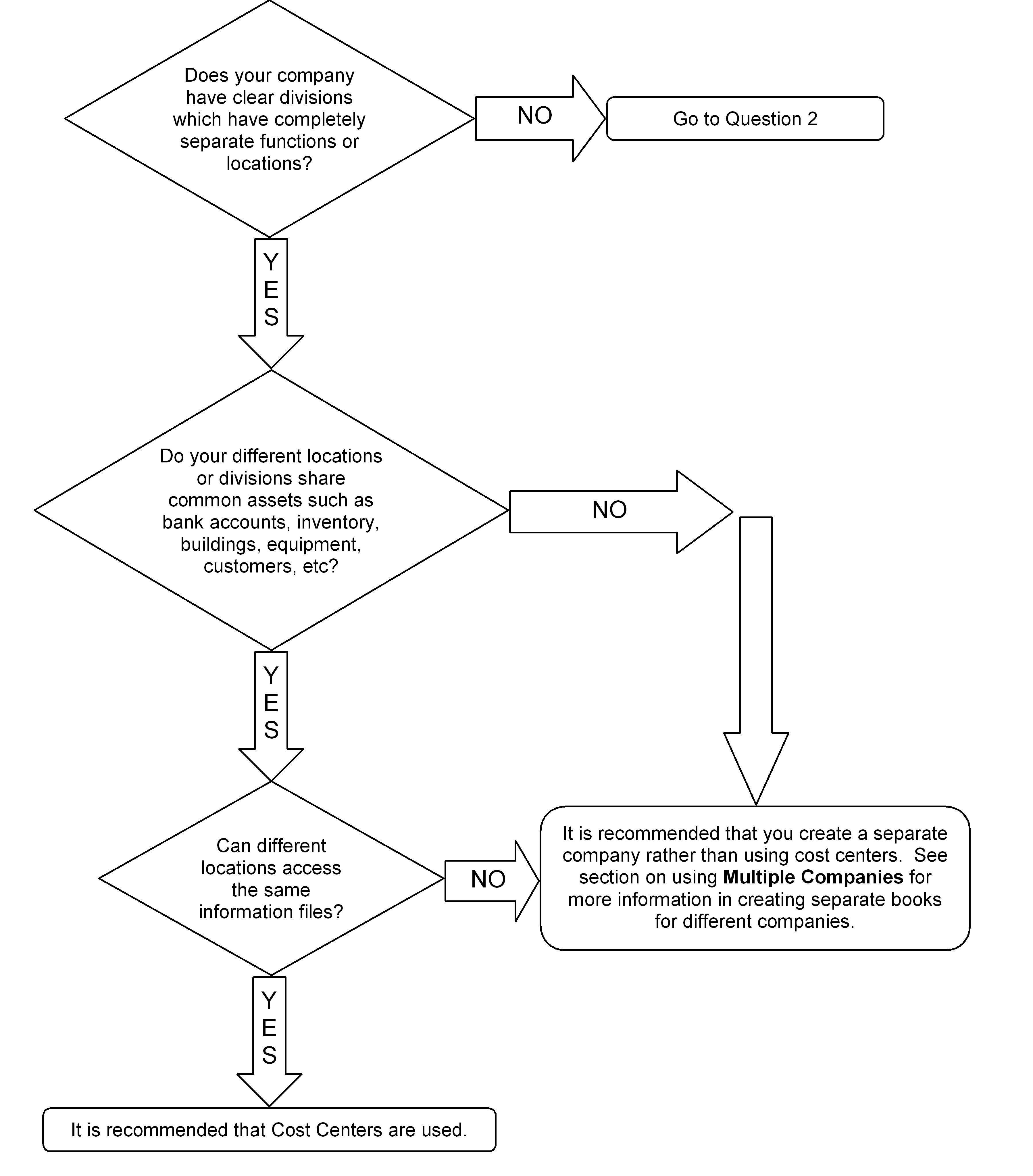
Should our Company Create Departments or Profit Centers?
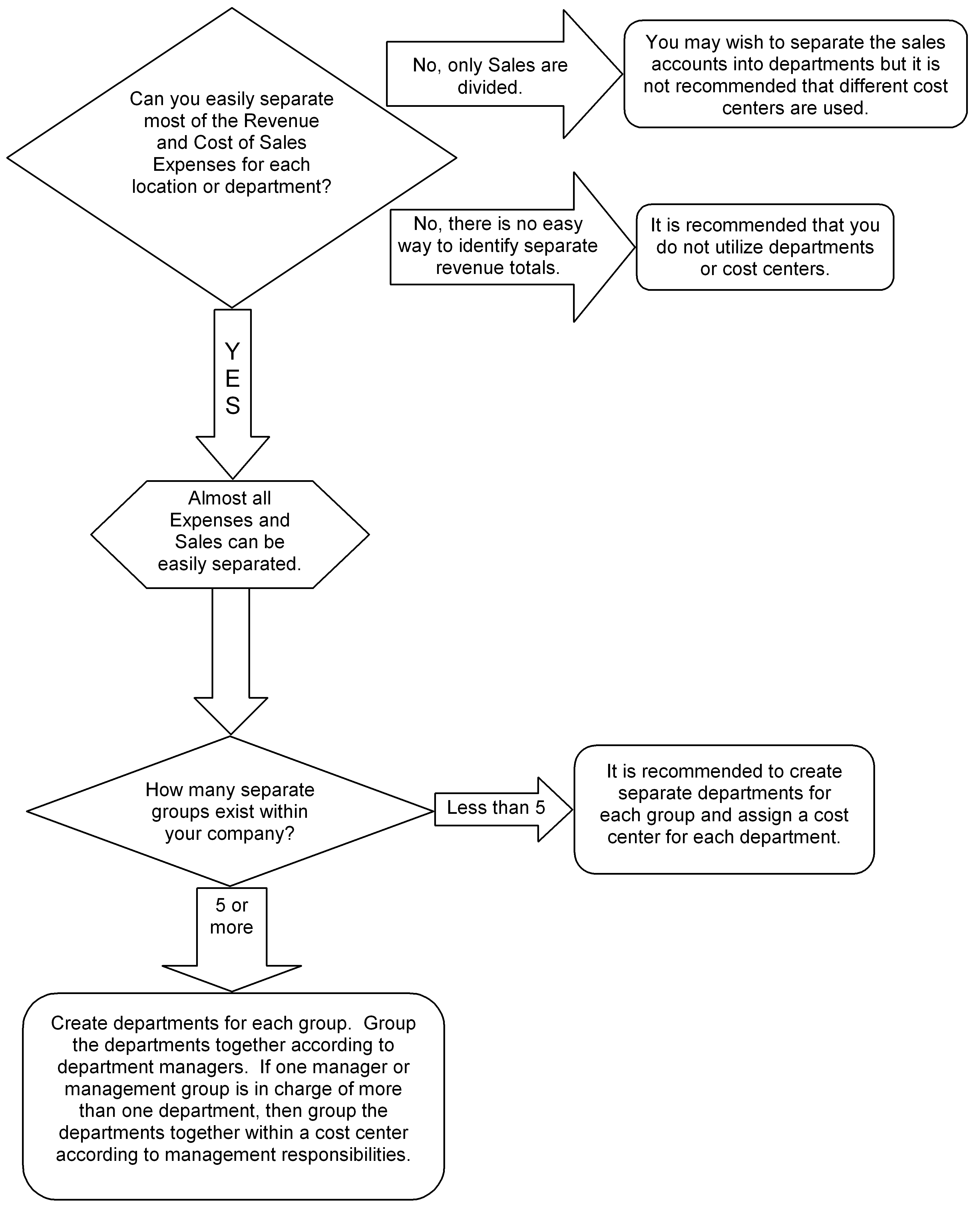
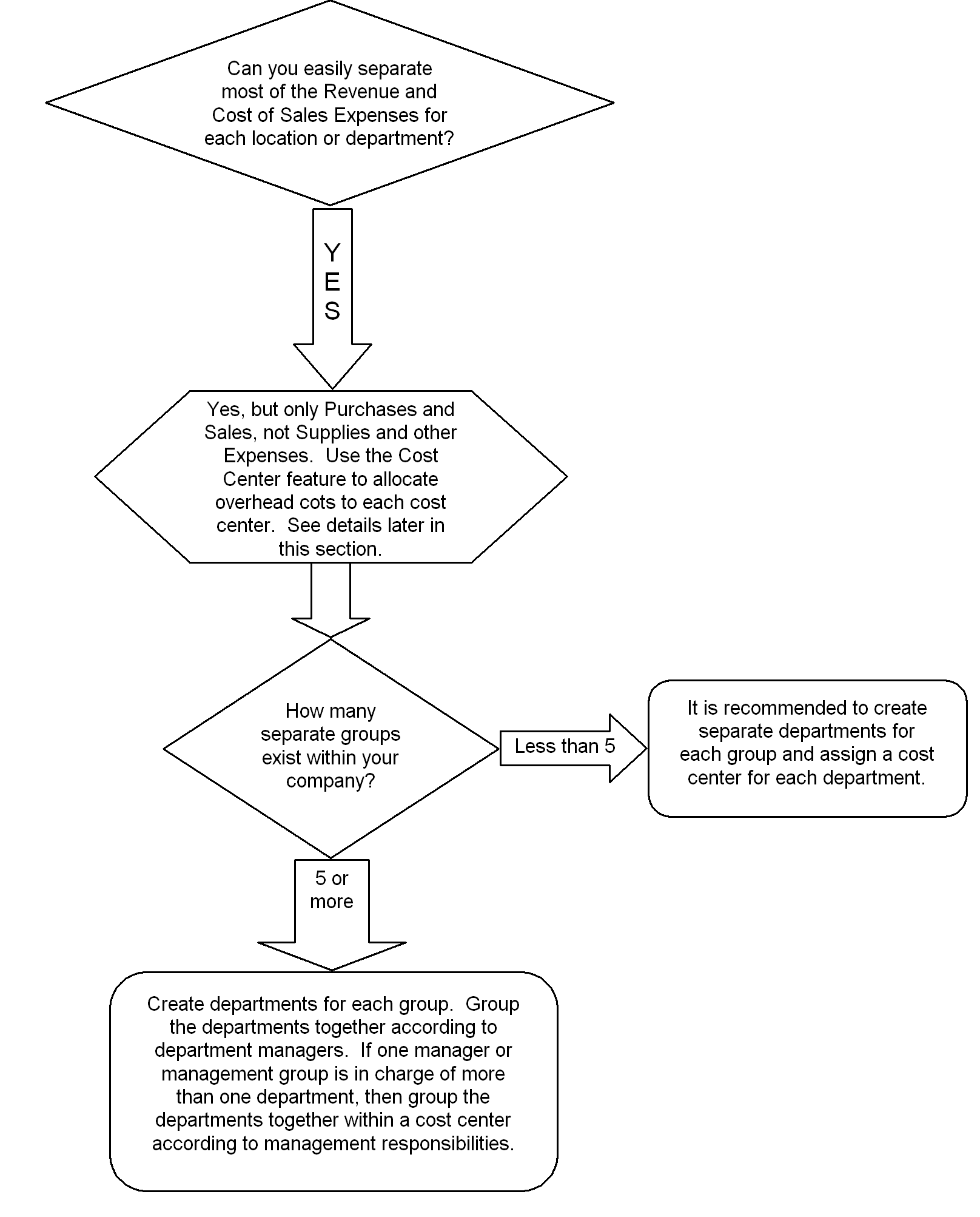
Following are some questions to ask to determine if departments or Profit Centers would be beneficial to your company. Note that these are only general recommendations and you may wish to consult with your accountant or an EBMS consultant.
Question 1:
Question 2A:
Question 2B:
Please contact an EBMS consultant for assistance in planning the department structure.
Setting Controls for Using Departments and Profit Centers
Set the basic controls to use Departments and Profit Centers in the General Ledger > Options > Settings Tab
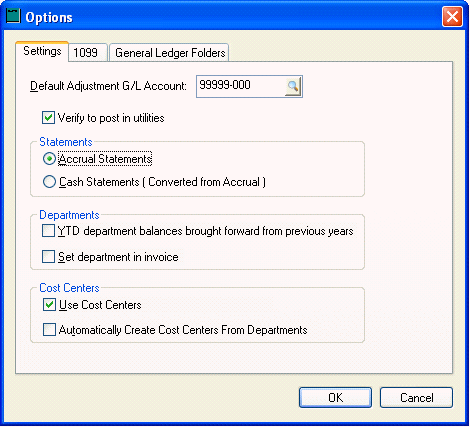
Departments Options
· YTD Department balances brought forward from previous years.
This switch determines if the running balance in the department history page is brought forward from the previous year to maintain a running balance from year to year.
ON
Turn this switch on ONLY if you plan to use the department as fund groups such as a ministry or a non-profit organization.
OFF
Normal setting.
· Set Department in Invoice.
This switch determines if a department is set or determined on the expense or sales invoice. If this switch is on the system allows a default department set for each customer.
ON
If you are using departments as locations or divisions in which balance sheet accounts are printed by department. This can also be used for a company who has a common inventory but wishes to identify the profits for inventory sold within individual departments (locations). Review the Using a Department as a Company Division or Location section for more details.
OFF
If inventory is purchased and sold within the same department.
Profit Centers Options
· Use Profit Centers
This switch will enable Profit Center buttons and processes.
ON
If you plan to use Profit Centers
OFF
If you are not using the Profit Center feature of this system.
· Automatically Create Profit Centers from Departments
ON
If all Profit Centers consist of only one department.
If this switch is ON, all Profit Center IDs are identical to the department ID code and the Profit Center window is accessed within the department window. See Profit Center button in General Ledger > Departments > General tab.
OFF
If any Profit Center consists of more than one department.
Profit Centers will be identified with a unique Profit Center ID enter in General Ledger > Profit Centers dialog. Review section on Setting up Profit Centers.