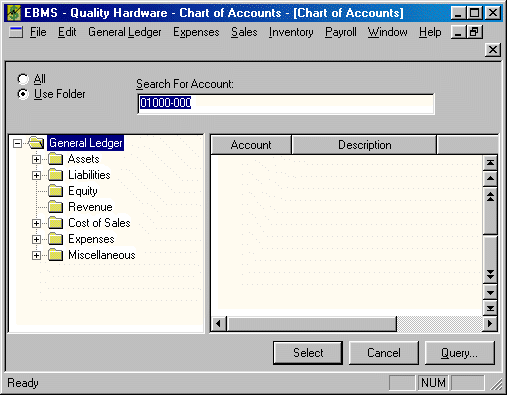
It is important that your numeric General Ledger Chart of Accounts are coded and grouped in a proper accounting method. It is recommended that you review this entire section before creating a new GL account. Proceed by printing the Chart of Accounts (Reports > General Ledger > Lists > Chart of Accounts) report and reviewing the way your list is arranged.
If you are inexperienced with adding accounts and are not familiar with the way your accounts are structured, it is recommended that you contact a consultant or your accountant. If you wish to have some direction from your EBMS consultant please fax an entire list of your chart of accounts and a description of the new account that you wish to create.
Creating a New Account
To create a new account to add to the chart of accounts take the following steps:
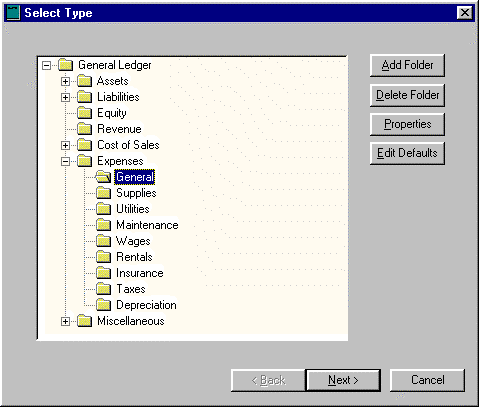
For details on the Add Folder, Delete Folder, Properties, and Edit Defaults buttons, see the section on Chart of Account Folders.
Click Next to continue.
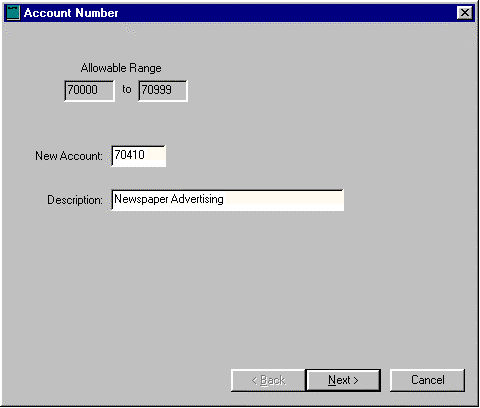
The new numeric account number must be within the Allowable Range shown. This allowable range is set within the General Ledger folders. If you prefer to number your account outside this range, than you must place the new account in a folder that allows the account that you wish to create.
Notice that the numeric codes within the standard chart of accounts are coded in a systematic way. All short-term assets start with the zero (0), while the first number in each long-term asset account is 1. Short-term liabilities start with 2 while long-term liabilities are 3. Equity accounts start with 4, revenue – 5, Cost of Sales – 6, and expenses - 7, You will notice that the first digit of the allowable range in our example starts with 7 telling us this is an expense account.
As you review your chart of accounts report, notice that the second digit in all accounts that are within the expense folder identify what group of general expenses they represent. For example, 70??? codes represent general expenses while 71??? codes identify supplies, 73??? – maintenance, and 75??? Utilities.
In our example, we will want to create a code that starts with the 70 digits. Notice that no other number would be allowed because our allowable range is between 70000 and 70999. Your chart of accounts may be structured considerably different from the example or the set that was distributed with the software. EBMS does not require that you follow the rules explained above but you will experience many benefits if you put some thought into your ledger structure.
In the example above, the newspaper expenses were kept separate from other advertising. Since the advertising account is 70400, create a new account for newspaper advertising coded 70410. Notice that the first three digits of the code identify the account as an advertising expense.
After you have entered the new account numbers and tabbed to the description line notice that if the code you entered was not five digits long the system added zeros to the right side of the account code. All general ledger codes must be 5 digits long.
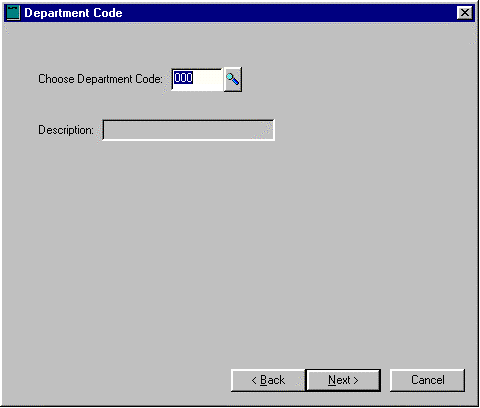
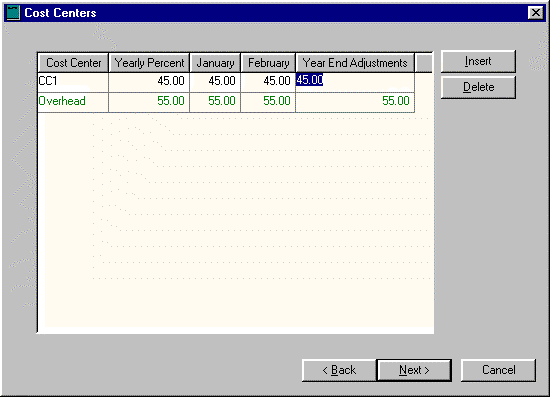
We need to identify which Profit Center this code is distributed to by taking the following steps:
Click Insert to create a new line.
Insert a Profit Center id in Profit Center column within the new line.
Enter a percentage that you wish to distribute to this Profit Center, which will be copied to each monthly column.
Change monthly percentage column for the monthly percentages that are not identical.
Repeat for each Profit Center involved or click next to proceed to the next step.
For more information on Profit Centers or details involving monthly distributing percentages see the Profit Centers section of this manual.
For more information on what to use for folders or classifications see the sections on Chart of Account Folders and Account Classifications.